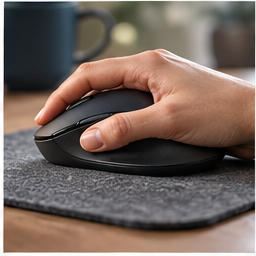
A vertical mouse changes how you hold a pointing device. Whether that feels useful depends on your hand, the work you do and where the mouse sits. The meaningful trial is a normal work session with familiar tasks, not a few clicks on a shop counter.
Find your next step
Select the situation you recognize. This identifies a research route, not a compatibility approval.
Read the decision checks ↓Separate reaching from gripping
Before ordering, move the mouse nearer the keyboard and remove objects that block its path. If a number pad forces it far to the side, compare the layout as well as the device. A vertical shell will not reduce that keyboard width. Work through a page of scrolling, text selection and dragging to identify whether the problem is location, effort, precision or a mix of them.
Why Lift is a specific candidate
Logitech positions Lift for small-to-medium hands and offers different handedness variants. The linked graphite listing is the right-handed option. That is a reason to investigate it for a matching hand, not a guarantee of fit. Check where your thumb rests and whether you can click and scroll without shifting your grip each time. A larger or left-handed user should not buy this exact variant merely because the category seems promising.
Account for the different movement
The taller shape can feel unfamiliar when moving between typing and pointing. During a trial, notice whether you bump it, squeeze it unnecessarily or struggle to lift and reposition it. Give ordinary office tasks a fair comparison at a sensible pointer setting, but do not force continued use through discomfort. Track precision as well as initial feel: a device that feels relaxed but makes your daily work harder still has a trade-off.
Connection and software are part of the decision
The listing describes Bluetooth and the included Logi Bolt USB-A receiver. Check which route fits the laptop and any managed-workplace restrictions. Logitech’s optional customization software can configure supported controls, but you should verify permission to install software before planning a workflow around custom buttons. A USB-C-only laptop may need a suitable connection route for a USB-A receiver.
Run a comparison you can remember
Use the same document and spreadsheet with the old and new device. Record missed selections, repeated grip adjustments and whether the mouse stays within easy reach. These are observations you can compare without inventing a medical outcome. Check the seller’s return terms before opening the trial, and keep the packaging until the daily routine—not only the first impression—supports keeping it.
What the recommendation can and cannot promise
Lift is relevant when the hand-size range, handedness and alternative grip match what you want to try. It is less compelling when the real problem is desk layout or when you need a different shape for precise specialist work. This article is product research, not hands-on testing or treatment advice. Persistent pain or numbness should be discussed with a qualified professional.
The decision at a glance
| Decision | Check | Reason to skip this variant |
|---|---|---|
| Hand fit | Small-to-medium positioning | Grip feels cramped or forces finger reach |
| Handedness | Linked option is right-handed | You need a left-handed model |
| Work task | Selection, dragging and scrolling | Control is worse during your real tasks |
Keep a vertical mouse when it fits your hand and improves your ordinary pointing tasks without introducing another problem.
Products for the relevant scenario
These are research candidates for the conditions above. Verify the exact variant and seller’s return terms before buying.

Logitech Lift — right-handed, graphite
Consider it for: A right-handed user considering a smaller vertical mouse.
Before buying: Check hand fit, connection method and the exact handedness variant.
Trade-off: A shape change is not a treatment for pain.
View product →
Logitech MX Master 3S Wireless Mouse
Consider it for: A user who has already tested mouse position and needs a conventional right-handed wireless alternative to compare.
Before buying: Check hand fit, operating-system support, receiver or Bluetooth route and workspace for the larger shell.
Trade-off: A different mouse shape is not a treatment for persistent symptoms.
View product →Sources and evidence
Based on product documentation and the sources below; DeskWise has not hands-on tested these products. Examples describe possible setups, not measured outcomes.
Editorial update: Aug 12, 2026. Product images correspond to their linked retailer pages. Prices and stock are left to the seller’s page.