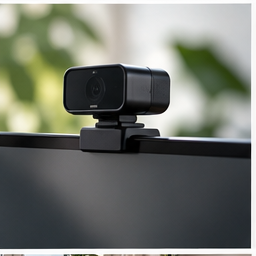
A dark face against a bright window can make a good camera look poor. A camera balanced too low can make every call feel awkward. Before ordering another webcam, record the same short clip after changing one condition. The comparison often reveals whether you need a light, a mount, a connection fix or a camera.
Find your next step
Select the situation you recognize. This identifies a research route, not a compatibility approval.
Read the decision checks ↓Create a repeatable comparison
Use the same application preview or local recording tool, the same chair position and the same background. Record a brief spoken sentence while moving your hands normally. Keep the original clip. Automatic exposure and background effects can change the result, so avoid changing three software settings at once. A still screenshot alone may hide motion blur or exposure changes that become obvious during speech.
Put useful light in front of you
If the window is behind you, temporarily turn toward it or close the blind and use a soft light in front and to one side. Re-record the sentence. Check the face rather than the decorative background. Move a bright lamp out of the direct line of sight and look for reflections in glasses. If this fixes the image at your usual calling time, a higher-resolution webcam was not the first missing capability.
Position the camera for the conversation
Place the lens near your normal eye line and the window containing the other person near the lens. You should be able to read the call without looking far away from the camera. If raising a laptop makes its keyboard awkward, use a separate input device or change the camera arrangement. Do not solve framing by creating an unstable stack under expensive equipment.
Separate picture quality from connection quality
Compare the local clip with what a trusted colleague sees on a call. If the local recording is clear but the call freezes, investigate network conditions and application behavior before buying optics. If both are dim or noisy, return to lighting and camera settings. A mount changes the camera position; it cannot increase network bandwidth or replace a sensor.
A mount is justified when placement will not stay put
Measure the attachment point and check the camera connection: a webcam clip, threaded socket and magnetic attachment are not automatically interchangeable. A monitor-top mount also depends on the screen edge and the camera load. The RAUBAY candidate below is relevant only if those details match. Keep the lens clear of bezels and cables, and make sure touching the keyboard does not make the picture visibly shake.
When a new webcam makes sense
Consider replacement after the setup gives the existing camera a fair chance and you can name the remaining problem: a required field of view, repeatable focus or a supported output mode. Check the mode your calling application actually uses. Judge the result in that application rather than from the largest resolution printed on the box.
The decision at a glance
| What you observe | Test next | Purchase route |
|---|---|---|
| Dark face, bright window | Turn toward light | Lighting only if placement cannot fix it |
| Good image, poor angle | Stable lens position | Compatible camera mount |
| Clear local video, poor call | Connection and application | Do not assume a new camera helps |
Buy the accessory that fixes the failing part of the call: light, position, connection or camera capability.
Products for the relevant scenario
These are research candidates for the conditions above. Verify the exact variant and seller’s return terms before buying.

Logitech C920x HD Pro Webcam
Consider it for: A setup where lighting, framing and connection have been tested and the current camera remains the clear limit.
Before buying: Confirm mounting, USB connection, privacy needs, available light and the exact listing configuration.
Trade-off: A new webcam cannot solve backlighting, a poor call connection or an unstable monitor.
View product →
RAUBAY CM01 Monitor Top Camera Mount
Consider it for: A compatible webcam needing a repeatable monitor-top position.
Before buying: Verify camera attachment, load and monitor-edge fit in the listing.
Trade-off: This does not add a camera or correct poor lighting.
View product →Sources and evidence
Based on product documentation and the sources below; DeskWise has not hands-on tested these products. Examples describe possible setups, not measured outcomes.
Editorial update: Jul 29, 2026. Product images correspond to their linked retailer pages. Prices and stock are left to the seller’s page.